Tuesday, February 26, 2013

Google’s plan to eat Amazon’s lunch and dominate retailing


Marc Andresseen, the kingmaker of Silicon Valley,  is fond of pointing out that “software is eating the world.” Google’s recent purchase of Channel Intelligence, a data management platform for retailer inventory, underscores its unstated, Borg-like goal of slowly gobbling up every industry it encounters.

This particular move, though, is a not-so-subtle signal to the marketplace that Google intends to become the dominant player in global ecommerce – which in the U.S. alone is already a $186 billion goldmine. Yes, for Google this is not just about going deeper into the ads business. The ever-expanding behemoth’s intention is to take a bite out of retailers margins too, starting first with those generated by ecommerce websites.


The first stop for shoppers

The Channel Intelligence purchase adds to the buzz that Google created back in October when it shifted its Google Shopping property to a fully paid ad marketplace, which by many accounts generated some $1 billion in the fourth quarter. And a Conductor study says that Google already influences over a quarter of all e-commerce transactions through its little search engine. These recent moves indicate that it seeks not only to go toe-to-toe with Amazon, but also to sneak up on other retail giants that sell both online and in stores.

Channel Intelligence (now part of Google) has a robust set of leading retail advertisers, which provides Google access to detailed retailer pricing and inventory data. Even more importantly, Google will get more valuable data on how those retailers convert browsers into customers. The ability to use its vast data resources to better understand retailer margins ultimately gives Google more pricing power for its ads.

Being able to offer retailers an easier way to deliver product inventory into its search engine will make Google a more formidable player in online shopping. Judging from the growing volume of retail-driven search on both Google and Amazon, it is clear that users are choosing to go to one of those spots to get the most up-to-date pricing and product availability. This is a two-way battle to be the consumer’s first stop. The winner of this battle will become the gatekeeper of the consumer through which all retailers will have to go to sell products.

Evolution to a digital store shelf

With the advent of today’s on-demand culture, Google is betting that it no longer matters who actually sells the product. Consumers are squarely in control and Google will increasingly help them find that product they are looking for, and do so at the right location for the right price. This was traditionally the role of ecommerce players like Amazon and massive offline retailers like Wal-Mart and Target.

However, with the growth of Google Shopping and the integration of those results into its core search engine, Google is quickly becoming the “digital store shelf” that it had always promised. For example, Google web search results today for retail queries tend to have at least 10 to 15 product images in addition to the traditional blue links. As Google starts to aggregate retailers’ local inventory – a probable next step on its roadmap with Channel Intelligence – it will be able to compete more aggressively in the mobile commerce space as well, directing consumers to physical stores in exchange for more ad dollars.

Not just ecommerce but all commerce

Make no mistake about it, Google is making a play for all retail with its recent moves and every retailer should be worried about the implications. (Rumors are swirling this week that the company has plans for its own branded retail outlets.) However, while Google is dominant in search, it is not the global ecommerce leader yet. It does not own significant pieces of the customer relationship (e.g. shipping, customer support, and retention marketing) and retailers can remain competitive by investing in areas that will stave off commoditization. Because as we all know, once you are a commodity, you will be traded like pork bellies and sold to the highest bidder. And that’s no place for a great retail brand to be.

The promise of e-commerce is having informed consumers finding the products they need from the brands that they love. Here are a few things marketers should employ to fend off Google’s advances:


  • Focus on your brand’s value proposition and how it will be perceived in a Google search and other ad channels. Highlight what makes you unique so that you don’t become just another slot in a price list.
  • Stay away from Google’s tools that track revenues/profits. Otherwise you’re simply handing over your business’s most valuable data.
  • Develop mobile sites and apps that are a first stop for shoppers on the go, offering a better alternative to a Google search for prices.
  • Devote resources to customer experience and personalization as a way of differentiating and bettering a basic search that’s more challenging for consumers.


HP Slate 7 hands-on


Well, this might just be the biggest news to come out of Mobile World Congress. Long after discontinuing the TouchPad (and the rest of its mobile devices, for that matter) HP is back with a new tablet. This time, though, it runs not webOS, but an old safety: Android. Interestingly, though, HP is returning to the tablet space not with a high-end flagship, but a lower-end device priced to sell. The Slate 7 is priced at $169, with modest specs that include a dual-core A9 processor, 1GB of RAM, 16GB of built-in storage, a 7-inch, 1,024 x 600 display and dual 3MP / VGA cameras. All that said, it could be worth a second look when it goes on sale in April. Meet us past the break to see what we mean.

For a tablet priced at $169, the Slate 7 feels decently well-made, and pleasant to hold. A stainless steel frame lends the whole thing some much-needed rigidity, while the matte, soft-touch finish on the back gives the fingers a comfortable resting place. It’ll be sold in silver and red, though we’re partial to the Beats Red (that obvious Beats Audio branding aside). And yep, this does have Beats in tow, like almost every HP laptop and Ultrabook already on the market. We didn’t get to sample that here at Mobile World Congress, but you know how we feel about Beats anyway. In any case, we like the design. We think we like the Nexus 7 a little more — it feels more substantial, and the screen is sharper — but it’s close.


To answer a question most of you probably have about the display, it’s not an IPS panel. Instead, it makes use of FFS technology, which HP claims will create a good viewing experience in low-light conditions as well as harshly lit ones. Alas, it’s really, really bright on the show floor here, but we can say that the screen holds up well underneath these fluorescent lights. We’d say if you were to put the tablet on a table with the screen face up, you’d still be able to follow along with a movie. All that said, the screen looks a tad washed-out. That’s not to say the colors lose their potency when you view the display at off angles; it’s just that the tones aren’t that vibrant to begin with.

Finishing our tour around the device, you’ll find a micro-USB port at the bottom for charging, along with those twin speakers. On the right side is your all-important volume rocker, while the top edge is home to a headphone jack, power / lock button and a microSD slot — something the Nexus 7 is missing. The buttons are made of chrome and seem easy to press, so kudos to HP for using premium materials where it can.

As for performance, Android lags slightly on that dual-core CPU, but we wouldn’t say it’s any worse than what you’ll experience on other budget tablets. We’d have to live with this thing for a few days to really say for sure. In the meantime, we’d like to say thank you to HP for using stock Android — the world really doesn’t need another custom skin, don’tcha think? We’ll obviously be reviewing this when it comes out in April but for now, we’d say the Slate 7 has a shot at this low price, though it’s going to have some handsome company down in the bargain-basement price range.

Sunday, February 24, 2013

BREAKING: Samsung ditches own AMOLED and EXYNOS inside new Galaxy S IV


Yes you just read the title of this message right. Our insider just gave us the first official “unconfirmed” specifications of the next generation Galaxy S, the Galaxy S IV. The Galaxy S IV will no longer use the Samsung EXYNOS processor and according to the latest rumours this processor has overheating issues. Today we can confirm Samsung will use the Snapdragon 600 and it is clocked at 1.9 Ghz which is 0.2 Ghz higher than the HTC One. The Galaxy S IV will have 2 GB of RAM and will come in three variants 16, 32 or 64 GB. As the rumours earlier reported Samsung is going to use a Full HD display. The Galaxy S IV uses a 4,99″ Full-HD SoLux Display we have no information if this is based on LCD3 like the HTC One. But a couple of months ago we posted the first hint regarding Samsung’s LCD factory is ready to produce Full HD panels from early 2013. And we also know Samsung’s AMOLED factory does have many problems with the production of full HD AMOLED screens.

We also know more about the build and dimensions of the device. According to our insider the dimensions of the device are 140.1 x 71.8 x 7.7mm and the weight is 138 gram, the new Galaxy S IV will use a home button and will have touch buttons. If you look at the photo below you will see that it will be square formed again, so they dropped the Galaxy SIII design line. He also said the sides are made from aluminium but the back is still plastic which automatic hints to a removable battery which is good to know.

Yesterday we already found out that the Galaxy S IV will have a 13 megapixel camera. Some leaked photos created by the Galaxy S IV showed up to confirm that.

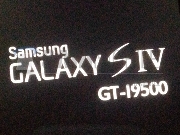
If our insider is right again this is a bad sign for all the EXYNOS and AMOLED freaks out there. Below a list of the confirmed specifications through us right under the specification list you will see the boot screen photo.


  • - 4,99″ Full-HD SoLux Display
  • - Snapdragon 600 1.9 Ghz
  • - 2 GB RAM
  • - 16, 32 or 64 GB
  • - 13 Megapixel
  • - 140.1 x 71.8 x 7.7mm
  • - 138 gram
  • - Home button with touch buttons
  • - Plastic back with aluminium sides
  • - Removable battery
  • - Black / White


Hacker says security flaw let him access any Facebook profile

The social network recently fixed a bug discovered by a developer who demonstrated how the loophole let him take over other people's accounts.


A security hacker recently found a flaw in a Facebook system that allowed developers to access anyone's Facebook account through app permissions.

Though Facebook has fixed this issue, Nir Goldshlager, a Web application security specialist who looks for these types of flaws professionally, found more app authorization bugs that need fixing, according to his blog. App permissions are what developers use to access the user data needed to run their apps. Users give them access permission when they install the apps.

"I found a couple more OAuth flaws in Facebook, just waiting for a fix to post about it," Goldshlager wrote in his blog, where he detailed his findings.


Facebook wouldn't comment on what other flaws Goldshlager may have found but did say the original bug he detected had not been taken advantage of by actual Facebook developers. The company didn't say when Goldshlager reported the flaw.

"We applaud the security researcher who brought this issue to our attention and for responsibly reporting the bug to our White Hat Program. We worked with the team to make sure we understood the full scope of the vulnerability, which allowed us to fix it without any evidence that this bug was exploited in the wild," a Facebook representative wrote in an e-mail to CNET. "Due to the responsible reporting of this issue to Facebook, we have no evidence that users were impacted by this bug. We have provided a bounty to the researcher to thank them for their contribution to Facebook Security."


Microsoft Hacked, Just Like Facebook and Apple


On Friday evening, Microsoft announced via its security blog that it, too, had been the victim of a cyber attack, comparing its situation to the likes of Facebook’s and Apple’s recent security breaches.

“During our investigation, we found a small number of computers, including some in our Mac business unit, that were infected by malicious software using techniques similar to those documented by other organizations,” wrote Matt Thomlinson, General Manager of Trustworthy Computing Security, in a company post.

Microsoft claims no evidence of customer data being compromised.

The security breach of the Redmond-based software company is just one in a series of high-profile tech company hacks, starting earlier this month with Twitter’s announcement that the data of some 250,000 user accounts could potentially have been compromised.

As we reported earlier in the week, laptops belonging to employees at Facebook, Apple and possibly Twitter were infected with malware after visiting an iPhone-focused software developer site. Sources have told AllThingsD that many other companies could have been infected by the malware-spreading site, and perhaps many more will disclose similar instances of hacking in the coming weeks.

And just yesterday, customer service management provider ZenDesk announced that it had been hacked as well. The fallout from that hack affected some of the companies ZenDesk provides its services to, including Pinterest, Twitter and Tumblr.

Microsoft did not respond to a request for further comment.


NFC: What You Need to Know


By now you may have heard of NFC. It’s been the next big thing for the past five years.


Okay, so maybe this tech hasn’t hit its stride yet. But there are several new mobile phones that claim “NFC” as a feature.
So what does NFC mean, how does it work and will it finally catch on? These are questions that many consumers will have as they hear more and more about this technology — and here are some answers.

What is NFC, in a nutshell?


NFC, which stands for near-field communication, is a type of communication that involves wirelessly transmitting data from one hardware device to another physical object, provided that the devices are in short range (within 10 centimeters) of one another.


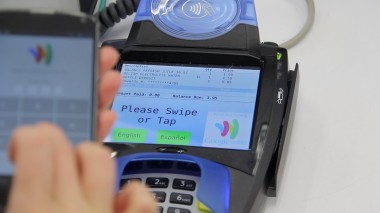
In order for NFC to work, both devices — say, for example, your smartphone and a payment terminal at your local CVS — have to have NFC chips and antennas embedded in them.

Though NFC might be new to you, the technology isn’t. The industry standard for it was established between 2003 and 2004. Over the past few years, NFC has become more prominent, but it’s still a long way from mass adoption. 


So … what is it used for? 


Some practical uses include bumping your phone against someone else’s to wirelessly (and paperlessly) exchange your contact information. You can also tap your phone against a laptop or computer to share photo files.


NFC is also used in marketing. You can, for example, tap your phone against an NFC-equipped movie poster or sticker, as long as the paper is embedded with an NFC chip, and more details about the movie will pop up on your phone’s Web browser.


One of the more interesting use cases I came across in my research was a beer dispenser created by a Google employee. It uses an NFC tablet to scan a person’s badge and determine if he or she is authorized to drink the beer. 

But, so far, the most prevalent use of NFC has been in payments.


But I can already tap my credit card to pay for things. Why is NFC any better than that?

You’re right: Consumers can already use a tap-to-pay method with some newer credit cards. But proponents of NFC on mobile argue that it’s even faster and easier to use the device that’s likely already in your hand — your smartphone — rather than digging around for the wallet that holds that credit card. 

Another big NFC pitch is that your smartphone could simultaneously store loyalty cards, coupons, tickets and boarding passes, so you could use your NFC smartphone to transmit and receive data in those accounts, too. 


However, that idea of the “mobile wallet,” or moving your credit cards and rewards cards to your phone, doesn’t necessarily require NFC. In fact, the mobile payments industry in the U.S. is pretty divided — there are those who are pushing NFC, and those relying instead on software solutions to make mobile payments.


The former includes Google Wallet, and a wireless industry venture made up of AT&T, Verizon and T-Mobile. The latter includes companies like Square, PayPal and even Apple, which offers a digital wallet app with the iPhone’s Passbook, though this mostly holds purchased tickets for things like flights and movies. 


Let’s say I’m into this idea of NFC. Which phones should I look for? 


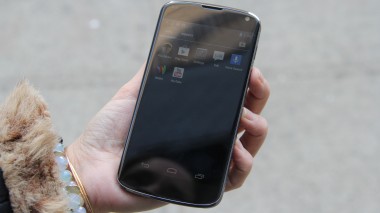
Apple’s iPhone isn’t equipped with NFC, but here are some, though not all, of the newer NFC-equipped phones available in the U.S.: Samsung Galaxy Note and Galaxy S III, Google Nexus 4 and Nexus S, Nokia Lumia 820 and Lumia 920, Sony Xperia Ion, Motorola Droid Razr M and Droid Razr Maxx HD, LG Intuition, HTC Evo 4G LTE, BlackBerry Z10 and BlackBerry Q10 (as well as many older models of BlackBerry).

Okay, I ran out and bought an NFC phone. Where can I use it? 


It’s impossible to know how many NFC “tags” are floating around out there, and it’s unclear exactly how many retailers will accept payments from your NFC phone. The roll-out of these NFC solutions has been slow.
Google Wallet can be used to pay at some CVS, Duane Reade, Old Navy, Radio Shack and Macy’s stores. Isis, the mobile wallet app from AT&T, T-Mobile and Verizon, could theoretically be used at 200,000 retail locations across the U.S. That sounds like a lot, but Isis right now has an actual presence in just two cities: Salt Lake City and Austin.


And let’s say you have an NFC smartphone and you’ve found a store nearby that will accept it. It still might not be a super simple tap-to-pay solution at first.
In my experience, I had to tap my NFC smartphone against the payment terminal a few times before the transaction went through, and got dubious looks from a couple cashiers who weren’t familiar with the process. I’m positive that swiping my credit card would have been easier.
But at the same time I think that paying with smartphones will get smoother.


Tapping to pay sounds easy … almost too easy. Is NFC secure? What if I lose my NFC phone?

Fraudsters are always trying different ways to tap into sensitive data. NFC technology has varying layers of security, depending on the use case and the hardware. 

When you link your NFC smartphone to your credit card, your data is actually stored in a tiny part of the hardware — like a little lock box within your phone. In some cases, this is in the SIM card, but it could be elsewhere in the phone, too. But note: this data is encrypted.
On top of that, you often have to punch in a personalized PIN on the phone in order to make a payment.

If your NFC phone is stolen, you can freeze or disable your payment account by calling the services or visiting a website. You can also call the credit card issuers directly and cancel your cards — just as you would if you lost your leather wallet.

So will NFC really catch on this time?
Some industry experts and analysts say NFC is still “three to five years” away from being mainstream — the same thing many were saying, well, three to five years ago. It has gained traction in parts of Europe and Asia, especially in Japan, where the wireless carriers have collaborated to push the technology.
NFC proponents say a mandate requiring retailers to update their payment terminals by 2015 could help nudge the technology along. And NFC is expected to be in more and more phones. All eyes are on Apple right now, to see whether NFC is included with the next iPhone.
But even with all of the tech infrastructure in place, there’s still the matter of changing consumer behavior — your behavior — one tap at a time.


Motorola reorganizes its device update page, promises Jelly Bean for Droid RAZR in Q1


We’ve seen Motorola release some time frames for updates to its device before, but more often than not, they’ve failed to keep those promises. Motorola’s Punit Soni did promise to make some changes to that behavior recently, and I think we’re starting to see some results from that.

Motorola has redone their device update page, which now allows you to sort out your device by country, carrier, and device. Once you’ve found your device, you can easily when it’s slated to receive an update, and when the last update was rolled out. Pretty handy, and significantly better than the huge page of cluttered information that it used to be. You can also sign up for emails to be notified when your device is set to receive an update.

And good news for Droid RAZR and RAZR MAXX owners, the new update page firmly states that both devices are set to receive Jelly Bean in Q1. We’re coming to the end of Q1, so you shouldn’t have to wait too much longer on the update, but we’ll be sure to let you know as soon as it becomes available.